



1st Page 2000 Tour
 |
Take a glimpse into 1st Page 2000 and see why it makes HTML coding a breeze. |
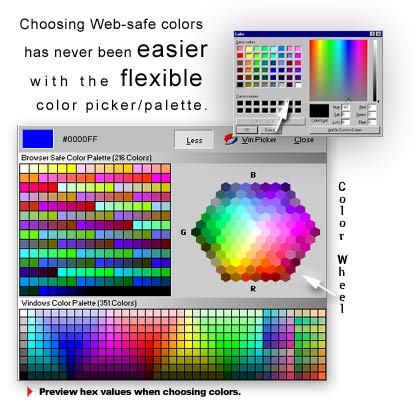
:: The Color Picker 1st Page 2000 allows users to quickly and easily choose custom colors in 4 ways. Colors can be choosen from the default windows color picker, a complete web-safe color wheel, a 216 web-safe color palette and even a complete windows color palette of 351 colors. The 4 way color selection gives absolute color management to web builders. |
||
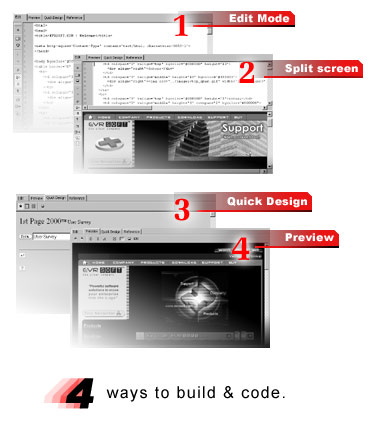
:: 4 Mode Editing With the 4 mode editing infrastructure integrated within 1st Page you can create webpages faster than ever before. The 4 modes are: Edit mode lets you see and hand-write html code into your webpage with 100% HTML Source preservation. Split screen mode lets you hand-write your webpage and view the rendered page in realtime with the integrated Internet Explorertm engine. Quick Design mode means exactly what the name suggests. Quick Design is the quick and easy alternative to creating webpages visually. Quick Design utilizes the Internet Explorer™ DHTML engine to let you add DHTML, Javascript, ActiveX and other leading technologies to your webpage. The way your page looks in Quick Design is the way it will look in most web browsers. Professionals can utilize Quick Design's possibilities by using it to quickly add/fix tables, layouts and designs. Preview mode lets you quickly preview your webpage internally with Internet Explorer. This time saving mode saves you time from having to launch an external copy of different browsers and switching to and from applications when previewing. You can switch to Preview mode by simply hitting the "F12" shortcut key. |
Next Page >>
Related
 Overview
 |